DeepSeek Deployment
Copyright © Quectel Wireless Solutions Co., Ltd. 2026. All rights reserved.
This document demonstrates how to deploy DeepSeek locally on the Quectel Pi M1 smart mainboard.
DeepSeek is a high-performance open-source large language model developed by a Chinese team. It offers strong capabilities in natural language understanding, code generation, and logical reasoning, runs efficiently in local environments, and is well suited for use cases such as intelligent Q&A, text generation, and code assistance.
Prerequisites
The Debian system on the Quectel Pi M1 has been successfully flashed and booted;
The system can access the external network.
Update Software Sources
Run the following command in the terminal:
sudo apt update
sudo apt upgrade
Before installing software, it is recommended to update the system packages to ensure dependencies are at the latest versions.

Install Basic Tools
sudo apt install curl
curlis a common command-line download tool that will be used when installing Ollama later. If the system indicates thatcurlis already installed, you can skip this step directly.

Install Ollama
Ollama is a lightweight model runtime environment that can deploy and run various open-source models locally.
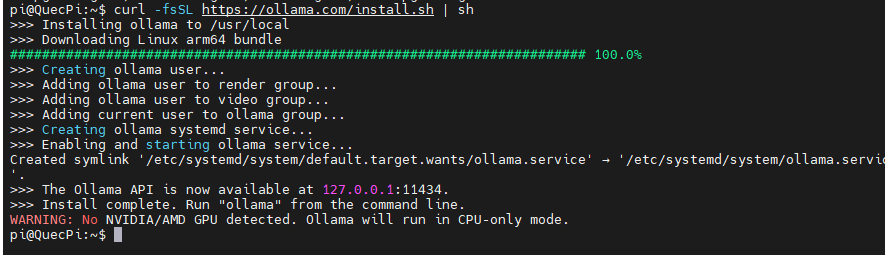
Run the following command in the terminal:
curl -fsSL https://ollama.com/install.sh | sh
Start the Ollama Service
Ollama requires a server process running in the background to manage models.
Open a terminal and execute the following command:
export OLLAMA_HOST=0.0.0.0:11435
ollama serve
This terminal window must remain open.
Run the DeepSeek Model
Open another terminal window and run the following command in it to pull and start the DeepSeek-R1 1.5B model:
ollama run deepseek-r1:1.5b
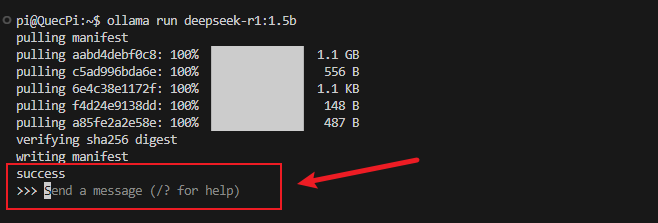
You can enter text in the red box area to start a conversation, for example:

FAQ
Download error: ERROR: This version requires zstd for extraction. Please install zstd and try again:
# Manually install the zstd library
apt update
apt install zstd
After running ollama serve, you see: bash: ollama: command not found
# Clean up old remnants first
rm -rf /lib/ollama
rm -f /bin/ollama /usr/bin/ollama
rm -f /etc/systemd/system/ollama.service

# Download the package to disk first, do not pipe
curl -L https://ollama.com/download/ollama-linux-arm64.tar.zst -o /tmp/ollama.tar.zst

# Manually extract
tar -I zstd -x -f /tmp/ollama.tar.zst -C /usr

ls -la /usr/bin/ollama

ollama --version